Quick video guide on how to handle map issues with your robot vacuum – check it out above! 🗺️
|

 VH252012
40 Floor
VH252012
40 Floor
|
|
|
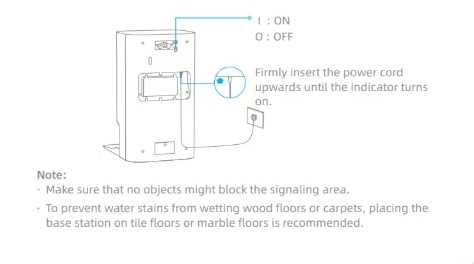
To help resolve this, please follow the step-by-step troubleshooting guide below: 1. First, please confirm whether the base station is powered on normally. Check whether the rocker switch on the back of the base station is turned on and make sure that the indicator light of the base station is on normally. 2. Next, please check whether the adapter plug is loose or damaged. Re-insert the adapter. If the adapter is damaged, it is recommended to replace a spare adapter to charge the robot. 3. Please wipe the charging shrapnel on the charging base to ensure that the charging shrapnel can rebound normally. At the same time, also wipe the charging contact piece on the robot. Place the robot correctly in the base station for charging, charge for 2 to 3 hours, and observe the power information in the APP to see if it can charge normally. 4.Confirm whether the robot is placed upside down. If so, guide the user to correctly position the robot inside the charging station for charging. If the problem persists after completing the above troubleshooting steps, please do not hesitate to contact us again.
2026-9-2 06:11
 US
Translate US
Translate |
|
OA395111
41 Floor
|
|
|
Regarding the issues of the mop pad installing/detaching failure, to better solve the issue, it is recommended to follow these troubleshooting steps: 1. Please confirm how long you've been using the current mop pad. If it has been used for an extended period, we recommend replacing it with a new one to see if this resolves the issue. 2. If the problem persists after replacing the mop pads, please inspect the magnet on the mop pad holder: a. Try switching the left and right mop pads to test functionality. b. Ensure you're using genuine Dreame mop pads. If using non-genuine products, please switch to original Dreame mop pads for proper compatibility and performance. c. Check if the magnet on the mop pad holder is rusty or has abnormal magnetic strength(refer to attached piture). If rust is found, we can arrange a replacement mop pad holder for you. 3. Perform additional troubleshooting: a.Remove the robot from the base station and detach the mop pad holders from the robot. b. Manually restart the robot and wait for it to fully reboot and return to normal status. c. After restarting, reinstall the mop pad holders back onto the robot. If the issue continues after completing all these steps, there may be a hardware issue.Please tell us the checking results ,we'll help you further. 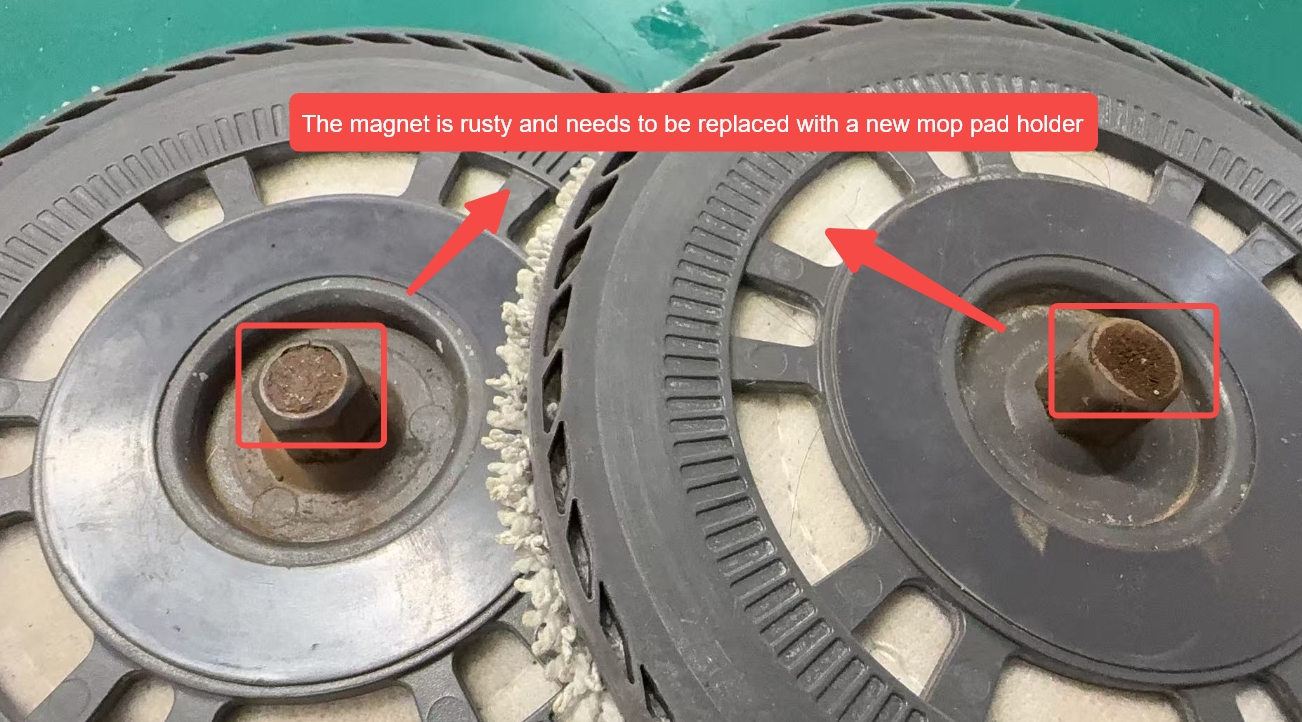
2026-9-2 06:13
US
Translate |
|
KQ624952
42 Floor
|
|
|
Could you please provide us some photos or videos? This will help us look into it.
2026-9-2 06:14
US
Translate |
|
XY244824
44 Floor
|
|
PR756272
45 Floor
|
|
|
Just to clarify — are you talking about the charging indicator light on the robot?
2026-9-2 22:32
US
Translate |
|
FI332337
46 Floor
|
|
|
|
|
RY742343
49 Floor
|
|
© 2026 Dreame Forum All Rights Reserved | Support by Discuz! X5.0 Font by MiSans